Your favorite plugins, in a console built for the stage.
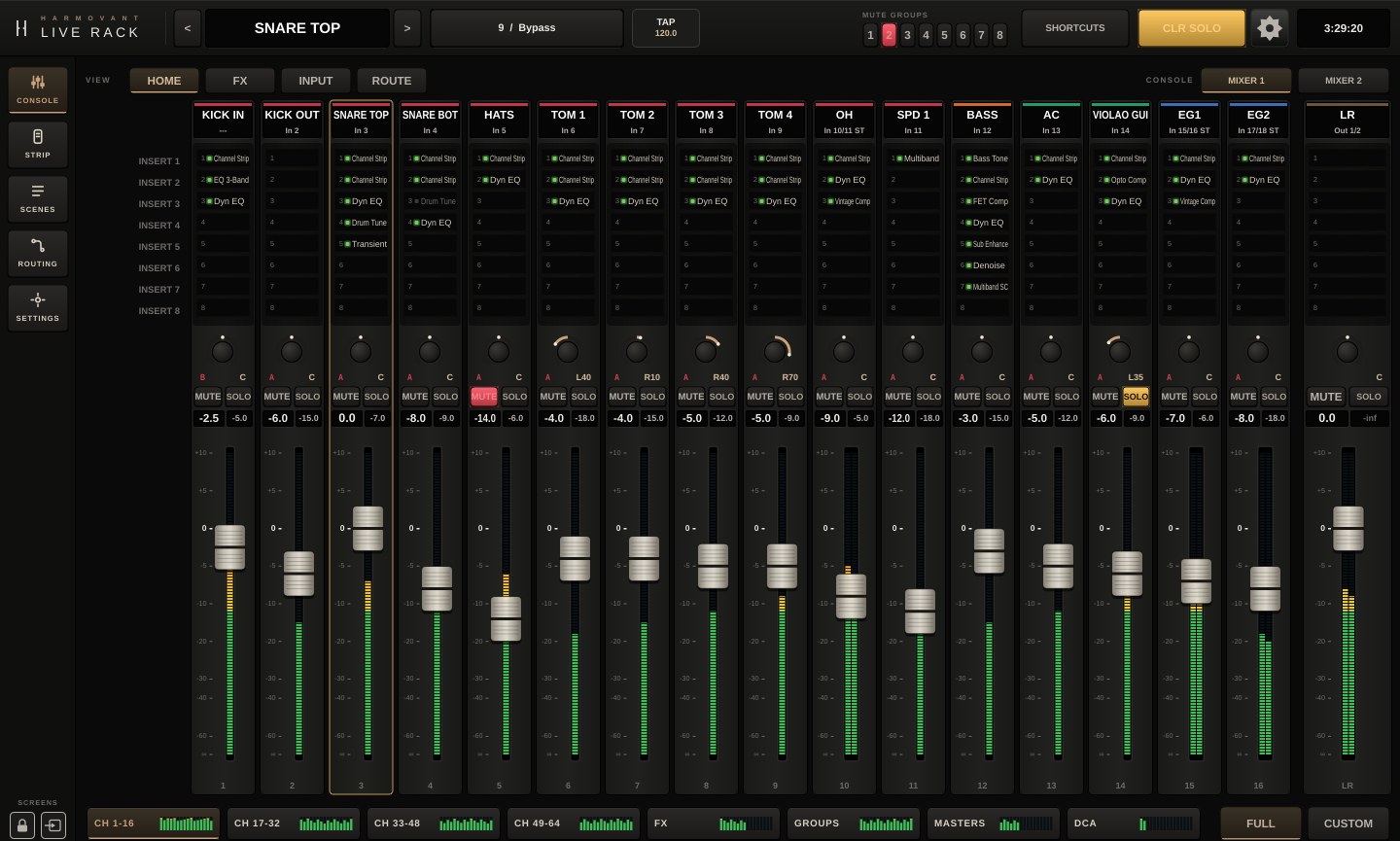
Live Rack turns an Apple Silicon Mac into a live mixing console with AU and VST3 plugin racks, scenes, DCAs, groups and matrices, using every core of the processor.
From sign-up to sound in minutes.
Create your account
Add a credit card. Nothing is charged today.
Download and activate
Install Live Rack, sign in with your e-mail and your Mac is activated.
Build your show
Choose your audio interface, open a saved show or start from scratch.
Everything the show needs, on one screen.
Full console
Up to 64 channels, 16 subgroups, 8 effect returns, 6 matrices, 10 DCAs, 8 mute groups, LR and CUE.
Plugin racks
8 inserts per channel with AU and VST3 plugins, search by name, drag to move or copy, and the plugin opens right inside the console.
Every core
Processing is spread across the Apple Silicon cores, with plugin latency compensation.
Touch and Slide
Touch a plugin control and adjust it from the bottom bar, without hunting for a tiny knob mid-show.
Scenes and shows
Scenes with scope and recall safe. The show stores everything: patch, routing, plugins, audio device and user keys.
Custom layers
Besides the fixed 16-channel layers, build CUSTOM layers with the channels, FX, groups and DCAs you want, in your show's order.
Safe startup
The app opens muted and the sound comes back with a smooth fade-in once everything has loaded, with no pops in the PA.
Works offline
Once activated, the app doesn't need internet during the show. The license renews itself whenever the Mac goes online.

The plugin opens in the console. The control stays in your hand.
On the channel screen you see input, rack and output together, with the plugin open in the middle. With Touch and Slide, touch a control and adjust it from the bottom bar, without hunting for a tiny knob mid-show.
Try it free for 14 daysLow latency, always in sight.
With low-latency plugins, the path from input to LR output stays between 5 and 14 ms, with the Safety buffer at stage 1 (the default), at buffer sizes of 32 to 128 samples at 48 kHz.
Per-path compensation
At each summing point, only the signals that sum together wait for the slowest one. A heavy plugin on one channel doesn't delay the whole console.
Reverbs left out
Mark FX reverbs and delays to stay out of the compensation. The console doesn't wait for them.
Dropout protection
The Safety buffer absorbs macOS spikes. It comes at stage 1, the recommended setting, and goes up to 3; whatever it adds is already in the total latency.
The real number on screen
The status bar shows only the real total latency, from input to LR output, including buffer, driver, plugins and Safety buffer.
* Measured with zero or very low latency plugins. Linear-phase or look-ahead plugins add latency; the total is shown in the app.
Requisitos mínimos
Mac with Apple Silicon
M1 or later · 16 GB of RAM or more
System and audio
macOS 11 (Big Sur) or later · Core Audio compatible audio interface · AU or VST3 plugins installed and licensed by you
Usage depends on the plugins you load. Heavy plugins, such as real-time pitch correction, may need a more powerful Mac.
Start free. Pick your plan later.
Both plans include every feature. The annual plan is 20% cheaper.
- 14-day free trial
- Every feature · 1 Mac at a time
- Cancel anytime
- 14-day free trial
- Every feature · 1 Mac at a time
- Price locked in US dollars for 12 months
Prices in US dollars. The first charge happens on day 15, after the 14 free days. Credit cards from any country, charged in US dollars; outside the US, your card's bank handles the conversion and may add fees or taxes.
Perguntas frequentes
How do the free trial and billing work?
You add a credit card (from any country), with no charge that day. You get everything for 14 days. On day 15 the subscription is charged automatically. Seven days before, we e-mail you a reminder with the date and amount. Cancel before that and nothing is charged.
Do I need internet during the show?
No. Once activated, the app works offline until the date shown in Setup › License. Just connect the Mac every now and then to renew.
I got a new Mac. What now?
Go to My account, deactivate the old Mac and sign in on the new one. You can also sign in on the new Mac directly: the license moves to it.
What is Live Rack's latency?
With low-latency plugins, it stays between 5 and 14 ms from input to LR output, with the Safety buffer at stage 1 (buffer of 32 to 128 samples at 48 kHz). The real total latency is shown in the app's status bar, in the Latency field.
Which plugins are recommended for live use?
Zero or very low latency Waves plugins: Q10, Renaissance EQ, SSL G-Equalizer, F6, CLA-2A, CLA-76, API 2500, Scheps Omni Channel 2, H-Reverb, H-Delay, DeEsser and Vocal Rider, among others. Avoid linear-phase and restoration plugins live, such as Linear Phase EQ, L3 Multimaximizer, Waves Tune and Clarity Vx.
What is the Safety buffer?
Protection against dropouts when macOS spikes, for example when switching apps or recording in another program. It has stages Off, 1, 2 and 3: each stage holds one more buffer, and the time it adds goes into the total latency. Recommended: stage 1, which is on by default. Off is not recommended for live use.
How does Live Rack compensate plugin latency?
At each summing point, only the signals that sum together wait for the slowest of them. FX reverbs and delays can stay out of the compensation, so the console doesn't wait for them.
Are plugins included?
No. Live Rack uses the AU and VST3 plugins you already have installed and licensed on your Mac.
What if my subscription expires mid-show?
Audio is never cut. The app keeps running until you close it and only shows a notice.
Can I cancel?
Yes, anytime in My account. Cancel during the trial and nothing is charged. After a charge, access continues until the end of the period already paid.
Take Live Rack to your next show.
14 days with every feature. No charge today. Cancel anytime.
Try it free for 14 days